By using TradingConnector, you acknowledge the risks of trading and agree that the system’s owners are not liable for any losses, including technical issues. The software is provided as-is, without financial advice.

Automate alerts from TradingView and Telegram to MT4/MT5 instantly – trusted by traders in the USA, Canada, Europe, and beyond.
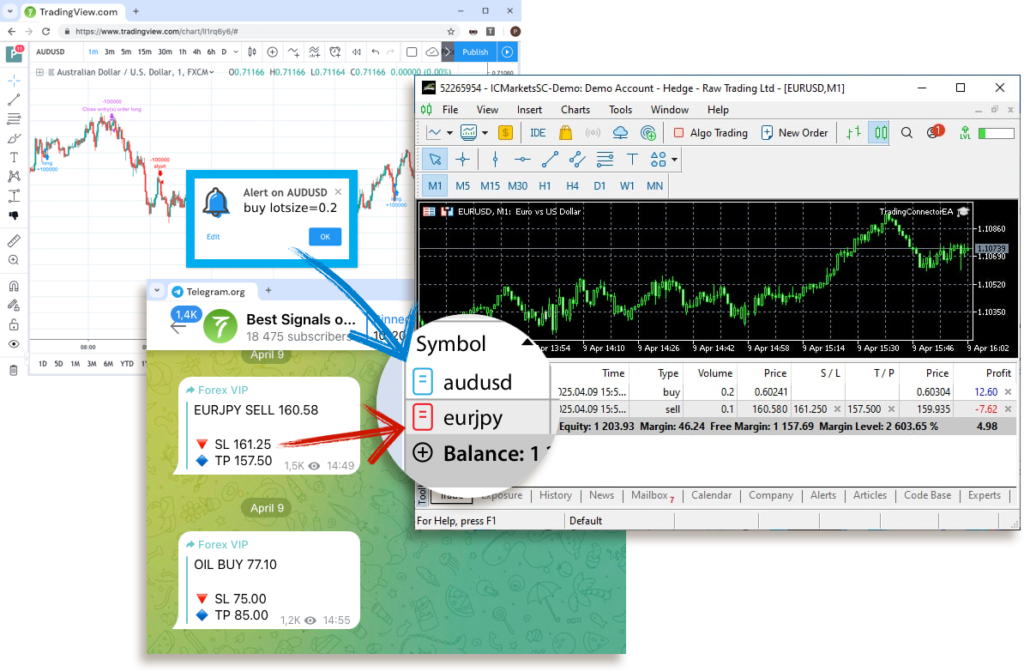
TradingView and Telegram are great sources of trading information, but they lack execution component. MetaTrader has is – over 1000 brokers worldwide offer it for trading on real markets with real money.




TradingConnector listens to alerts triggered by TradingView or on Telegram channels and forwards them to MetaTrader for lightning-fast and fully-automatic execution.


All of this happens automatically, without any interaction from the user in the meantime. Within 1 second from TradingView firing the alert, a trade is executed inside MetaTrader. This unmatched speed is achieved thanks to same-device routing: all 3 components (see below) are running on the same PC, so no delay is added because of signals travelling all around the Internet via API or webhooks. Some elasticity needs to taken into account when executing from Telegram Signals or via webhook, as these are incoming via API.
Which markets/symbols/tickers can be auto-traded using TradingConnector?
The answer is very simple – every symbol offered by the MetaTrader that your broker provided.
Even if TradingView/Telegram symbol name isn’t identical as in MetaTrader (read more in Alerts Syntax page).
Open long and short trades (aka buy/sell)
Place market orders or pending orders (stop/limit)
Set stop-loss, take-profit, break-even and trailing-stop already when entering a trade
Set these parameters as distance, percentage or particular price-levels
Move the stop-loss as trade progresses
Set fixed lot-size or as a percentage of available account balance
Split profit taking into parts
Automatically close position when reversing entry alert is triggered (or hedge – it is configurable)
Define above parameters for all trades or individually for each trade
TradingConnector connects TradingView alerts or Telegram signals directly to your MetaTrader 4 or 5 platform. When an alert is triggered or a message is received, the Connector automatically sends and executes the trade on your MT4/MT5 account — all within less than a second if properly set up.
No, you don’t need a VPS. TradingConnector is a serverless solution — it runs locally on your own device (PC, laptop, or dedicated machine). Keeping everything on the same machine ensures lightning-fast execution with minimal latency.
Yes! TradingConnector offers full customization. You can control StopLoss, TakeProfit, LotSize, Trailing Stop, Breakeven, pending orders, partial closing, and even dynamic variables inside your trade setups.
As long as your broker supports MetaTrader 4 or 5 (MT4/MT5), TradingConnector will work seamlessly. There are no restrictions based on broker type, asset class (Forex, Crypto, Stocks, etc.), or account size.
Yes! TradingConnector offers a free trial so you can test the system with your own alerts and broker setup before committing to a paid plan. This ensures you’re 100% confident in how it works.
Sign-up & Get 7-days Free Trial
By using TradingConnector, you acknowledge the risks of trading and agree that the system’s owners are not liable for any losses, including technical issues. The software is provided as-is, without financial advice.